



Managing asset data with spreadsheets can lead to errors, inefficiencies, and security risks. As portfolios grow, spreadsheets become harder to manage, with 90% of large spreadsheets containing errors. Moving to a centralized asset management platform like Oxand Simeo™ solves these issues by consolidating data, ensuring accuracy, and enabling advanced forecasting tools.
Here’s how to migrate your data effectively:
- Review your current data: Audit all spreadsheets, identify gaps, and eliminate duplicates.
- Clean and prepare data: Standardize formats, fix inconsistencies, and validate critical fields.
- Import data in phases: Test small batches first, then scale up to avoid errors.
- Verify accuracy: Compare migrated data with original spreadsheets and test platform outputs.
- Establish governance: Define roles, train teams, and implement validation rules.
This process ensures a smooth transition, reduces errors, and builds confidence in your new system. Oxand Simeo™ not only simplifies data management but also supports long-term planning, helping organizations save costs and achieve better outcomes.
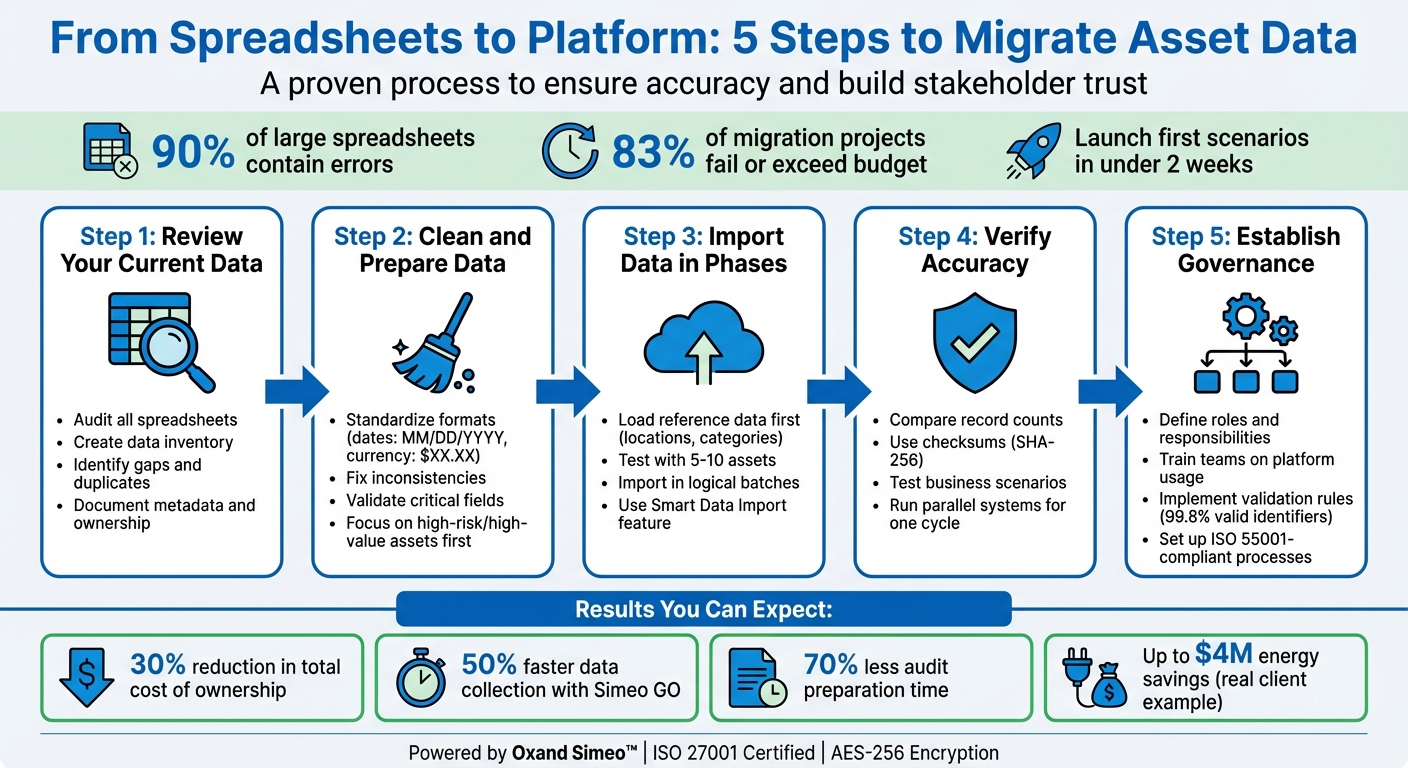
5-Step Asset Data Migration Process from Spreadsheets to Platform
Step 1: Review Your Current Spreadsheet Data
Before starting the migration process, take stock of all spreadsheets containing asset data – this includes everything from condition scores and risk assessments to vendor details and maintenance logs. The aim here is to create a full snapshot of your data landscape by noting where files are stored, who accesses them, and which business processes depend on them.
Start by documenting key metadata for each file: its storage location (e.g., shared drives, email attachments, or local desktops), the type of data it contains, how often it’s updated, and the team member responsible for it. This step often uncovers "shadow" spreadsheets – multiple versions of the same file being circulated among team members – which can complicate your migration efforts.
Create a Data Inventory
Set up a master audit sheet to consolidate your findings. Collaborate with team members at all levels to ensure that every relevant data set being used in daily operations is accounted for. Pay special attention to spreadsheets with custom macros or complex formulas managed by a single individual – these can pose risks if that person becomes unavailable.
Group your data into logical categories, such as IT equipment, HVAC systems, or structural components, and create separate spreadsheets for each group. While building this inventory, align your spreadsheet headers with the corresponding field names in Oxand Simeo™ to streamline the bulk import process later.
Find Data Gaps and Inconsistencies
After cataloging your spreadsheets, conduct a detailed audit of the fields to pinpoint potential issues. Look for missing condition scores, incomplete serial numbers, or inconsistencies in formatting, such as mismatched date or currency formats. Address common Excel quirks like auto-formatted dates or truncated identifiers to avoid carrying over errors.
Ensure your data is logically consistent. For instance, an asset’s "last maintained" date should never come before its "installation" date, and inconsistent spellings could lead to duplicate entries. Cleaning your data before migration is far more efficient – and less costly – than fixing errors afterward. Keep in mind that 83% of data migration projects either fail or go over budget and timelines [3].
Once you’ve completed your inventory and identified any discrepancies, you’ll be ready to clean and prepare your data for the next step in the migration process.
sbb-itb-5be7949
Step 2: Clean and Prepare Data for Migration
Once you’ve completed your data inventory and identified inconsistencies, it’s time to standardize and structure your spreadsheets for migration into Oxand Simeo™. With nearly 90% of spreadsheets containing errors [2], addressing these issues in Excel is much easier than troubleshooting after the migration. A well-prepared dataset lays the groundwork for a smooth import into the platform.
Standardize Data Formats and Attributes
Begin by ensuring all data aligns with U.S. standards. Convert dates to the MM/DD/YYYY format to maintain consistency in installation, maintenance, and warranty records. For currency fields, use the dollar sign ($) with two decimal places (e.g., $12,450.75) and eliminate any inconsistent symbols or formatting. For numbers that should remain as text – like asset serial numbers or building codes – add a single quotation mark at the start to prevent Excel from auto-formatting them incorrectly [6].
Download a sample CSV template from Oxand Simeo™ to ensure your spreadsheet headers match the field names exactly. This step helps avoid import errors. Standardize criticality labels by using only predefined values like "Normal", "Important", and "Critical" to ensure consistency in risk reporting [5]. If you’re creating an asset hierarchy, include a "Parent Asset" column to define relationships between components. This allows Oxand Simeo™ to automatically build a multi-level asset tree during the import process [5].
Replace any formulas with static values to prevent errors during migration, and remove hidden rows or columns containing outdated or irrelevant data [6]. By standardizing your data, you can focus on identifying and prioritizing your most important assets for migration.
Focus on High-Risk or High-Value Assets First
Instead of tackling your entire asset database at once, take a phased approach. Start with assets that pose the greatest operational risk or have the highest replacement costs [3]. For these high-priority assets, validate business rules to ensure logical consistency. For example, confirm that an asset’s "last maintained" date doesn’t come before its "installation" date. Also, verify that location data – like building names or site codes – matches entries in your master facility list [4]. This attention to detail helps build trust in the accuracy of critical asset data.
Once you’ve validated high-value assets, extend the same cleaning and preparation process to the rest of your inventory. This phased strategy ensures your migration process is both efficient and reliable.
Step 3: Import Data into Oxand Simeo™
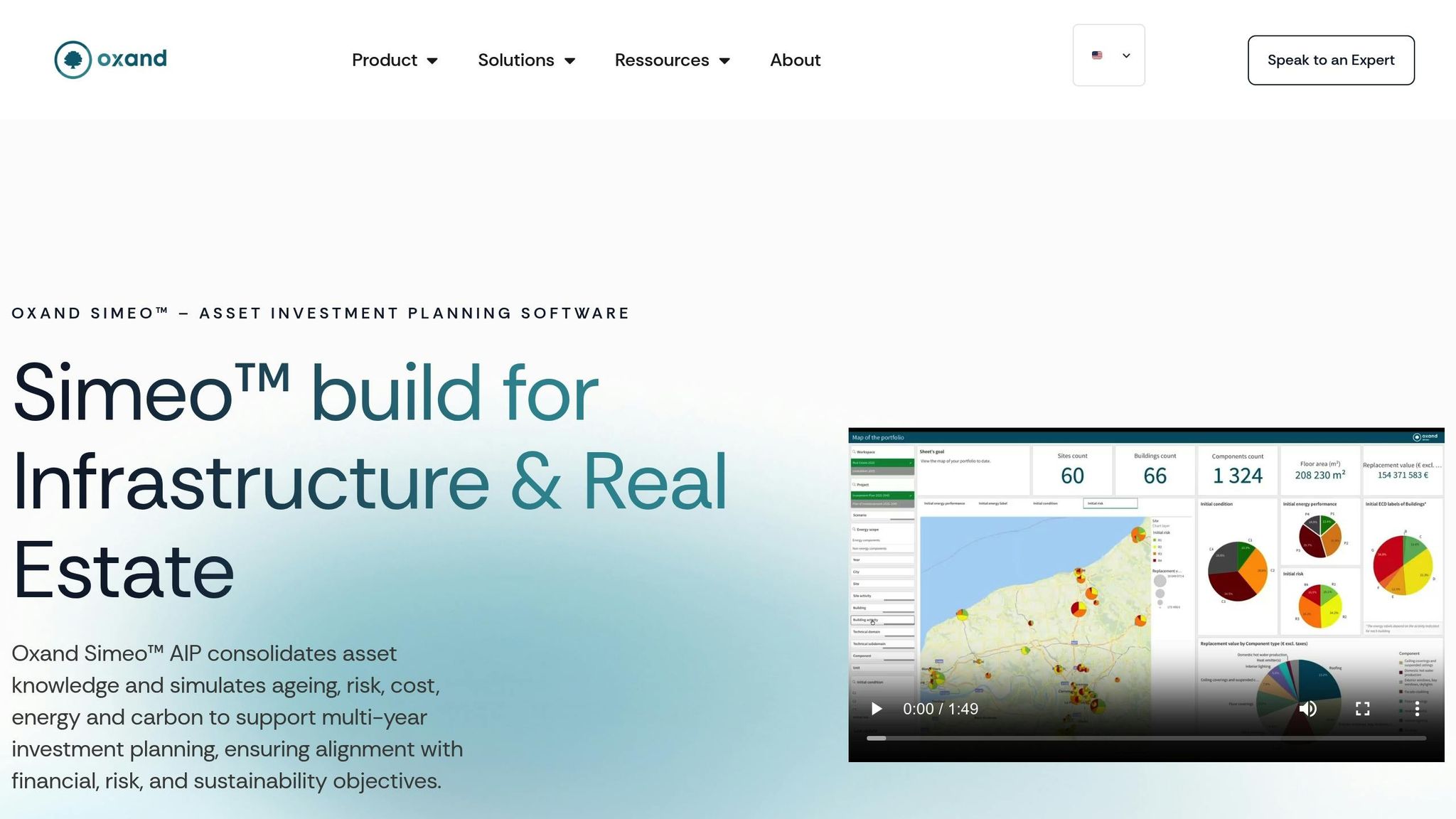
Now that your data is cleaned and prioritized, it’s time to move it into Oxand Simeo™. The platform’s Smart Data Import feature simplifies the process, allowing you to bulk upload legacy spreadsheets, CMMS exports, or BIM models using CSV files and APIs [10]. Many users manage to import their data and launch their first multi-year investment scenarios in under two weeks [10]. To ensure a smooth transition, map your spreadsheet columns carefully and test small batches of imports before committing to a full migration. Once your data is standardized, you can seamlessly transfer it into the platform.
Map Spreadsheet Data to Platform Fields
Start by loading reference data – locations, categories, buildings, and team members. This step is crucial because records referencing locations or categories that don’t yet exist in the platform will be rejected [8][9].
Each asset record must have a unique identifier, such as an Asset ID or Serial Number, to avoid duplication during the import [7][8]. Match your spreadsheet columns to Simeo Inventory fields, including asset conditions, risks, energy performance metrics, and renewal values. Remove any unnecessary columns to prevent overwriting existing platform data [10][7]. Be sure to save your final CSV file in UTF-8 format [9].
Once your data fields are aligned, validate your setup by running test imports.
Use Phased Imports to Build Confidence
Begin with a small test import of 5–10 assets to confirm your field mapping and data type alignment [7][9]. Review the platform’s confirmation screen for errors. If any records are skipped, use the error report to identify issues, update your spreadsheet, and re-import [8]. This iterative process – testing, correcting, and re-testing – helps you build confidence before scaling up [4].
When your test import is successful, proceed with migrating data in logical batches, such as by asset class, building, or region [3]. Start with less critical or historical assets, and once the process is running smoothly, move on to high-value, active assets [3]. For added assurance, run both systems in parallel for one reporting cycle to verify data accuracy before fully retiring the old system [3]. This step-by-step migration minimizes disruptions, ensures data integrity, and provides stakeholders with clear evidence that the new platform is reliable and effective.
Step 4: Verify Data Integrity and Build Stakeholder Trust
Once migration is complete, proving the accuracy of your data is critical to earning stakeholder trust. Studies reveal that 83% of migration projects either fail or exceed budgets and timelines, often due to poor validation rather than technical hurdles [12][3]. Stakeholders need clear proof that the new platform holds accurate and dependable information before they can rely on it for decision-making.
Compare Migrated Data with Original Spreadsheets
Start by verifying the total record count. Compare the number of assets in your original spreadsheet with what appears in Oxand Simeo™. For instance, if your spreadsheet listed 1,247 assets but the platform shows only 1,240, seven records are missing [11][13]. To catch more subtle errors, use checksums like SHA-256 to identify issues such as shifted decimals or incorrect dates [11][12].
For a deeper check, focus on field-level accuracy using representative samples rather than manually reviewing every record. Pay special attention to edge cases – assets with the highest replacement values, the oldest installation dates, or the most complex attributes. Compare these records field-by-field between the spreadsheet and the platform [11][12]. Additionally, confirm that parent-child relationships and foreign keys remain intact to ensure referential integrity [12][13].
Once record-level validation is complete, move on to testing the platform’s operational performance through real-world scenarios.
Test Scenarios to Confirm Platform Reliability
Begin with a business logic test. For example, if your spreadsheet shows a total asset replacement value of $12.5 million, calculate the same value in Oxand Simeo™ and compare the results [11][12]. Then, test predictive scenarios by using Simeo’s tools, such as deterioration models and multi-criteria prioritization, to generate a five-year maintenance plan for a specific building or asset category. Compare these outcomes with your team’s historical plans or known maintenance schedules.
Demonstrating that the platform can not only store data but also turn it into actionable insights builds trust. If the platform highlights the same high-risk assets and budget requirements as your previous manual processes, stakeholders will feel more confident in its reliability. To further strengthen trust, consider running the platform alongside your existing system for one reporting cycle. This parallel testing allows you to validate outputs under practical conditions before fully transitioning away from spreadsheets [3][12].
Step 5: Set Up a Governance Framework for Long-Term Success
Once you’ve verified data integrity, the next step is to establish a solid governance framework to keep everything running smoothly over time. Data migration is just the beginning. Without clear rules and accountability, even the most advanced platform can fall into the same traps as outdated spreadsheets. Considering how often errors occur in legacy systems, a governance framework helps prevent those pitfalls by assigning responsibility, creating update protocols, and defining standards everyone must follow.
Centralize your governance efforts to move away from processes that rely too heavily on individual expertise. The framework should create a centralized "single source of truth", ensuring repeatable processes that don’t depend on one person’s custom formulas or macros [1]. This includes assigning clear roles for data stewardship across departments [16] and setting measurable benchmarks, such as achieving 99.8% valid identifiers, to maintain high standards [16].
Train Teams on Platform Usage
Training your team is where governance becomes actionable. People need to know not just how to use Oxand Simeo™, but also how the platform integrates into their daily tasks. Whether it’s portfolio managers running budget scenarios, operations teams conducting inspections with Simeo GO, or executives reviewing investment plans, everyone needs to see how the platform improves their workflows.
Address skills gaps early in the transition. Moving to a new system introduces changes, and staff need to be prepared to handle new tools and processes to avoid mistakes [15]. Focus training on updated business workflows rather than just the technical ins and outs of the interface [3]. For field teams, using Simeo GO to replace manual paper-based inspections ensures consistent results and enables 50% faster data collection compared to traditional methods [10].
Past projects have demonstrated measurable gains in efficiency and revenue when training programs were well-executed. For example, prioritizing high-value use cases and tracking data lineage allowed analysts to reuse reports effectively – leading to faster dashboard creation and increased revenue [15].
Develop detailed runbooks that outline everyday procedures like inspections and reporting, include step-by-step instructions for common tasks, and provide emergency contact lists [16]. Update compliance manuals, disaster recovery plans, and internal documentation to reflect the new workflows [3]. Position asset management training as a way to build leadership skills in risk-based investment planning, rather than just focusing on technical software use [14].
Define Data Validation Rules and Audit Processes
To maintain trust in your data, you’ll need strong validation rules and audit processes. Use field-level validation in Oxand Simeo™ to catch issues like missing cost basis or mismatched currency formats. Leverage the platform’s ISO 55000 checklists to ensure data quality during collection, and set up real-time dashboards to monitor and quickly resolve discrepancies [3][10][15].
Align your governance framework with ISO 55001 standards, which formalize asset management policies, strategies, and plans (SAMP/AMP), ensuring your processes are always audit-ready [14]. Oxand Simeo™ simplifies this by automatically generating traceable evidence trails and ISO 55000-compliant reports, cutting audit preparation time by 70% [10]. This automation eliminates the need for manual regulatory tracking and provides reliable evidence for compliance [14].
Protect your data’s integrity by implementing role-based access control (RBAC) with Single Sign-On (SSO), ensuring only authorized personnel can make changes to asset information [10]. The platform’s ISO 27001-certified infrastructure and AES-256 encryption provide enterprise-level security, far surpassing what spreadsheets can offer [10].
Regularly assess your governance framework’s maturity through periodic ISO 55001 audits and SWOT analyses to ensure your asset management practices stay up to date [14]. Configure analytics dashboards to deliver instant insights for executive queries, fostering transparency in capital allocation decisions [14][10]. Together, these steps build a governance framework that ensures data quality and earns long-term trust from stakeholders.
Conclusion: Data-Driven Asset Management with Oxand Simeo™
Switching from spreadsheets to Oxand Simeo™ revolutionizes long-term asset management by establishing a single, reliable source of truth. This eliminates the common pitfalls of spreadsheets, such as version control issues and high error rates [1]. By following the outlined migration steps, organizations can transition smoothly and embrace a more efficient, data-driven approach to managing their assets.
The benefits of this shift are striking. With access to 10,000 proprietary aging laws and 30,000 maintenance actions, Oxand Simeo™ helps you move from reactive problem-solving to proactive planning [10]. It enables precise forecasting of asset degradation and costs years ahead, while also letting you test investment scenarios against constraints like budget limits, risk levels, energy performance, and carbon reduction goals [10]. Many users successfully launch their first multi-year investment scenarios within two weeks of importing their data [10].
The financial advantages are equally compelling. Organizations can cut their total cost of ownership (TCO) by up to 30% by optimizing intervention timing. Some achieve full ROI within a single budget cycle [10]. Field teams using Simeo GO collect data 50% faster than traditional paper-based methods, and automated ISO 55000 compliance reporting slashes audit preparation time by 70% [10]. In real-world cases, clients have reported energy savings of up to $4 million across 66 buildings within the first budget cycle [10].
Beyond the financial metrics, Oxand Simeo™ strengthens trust among stakeholders. Automated dashboards and audit trails provide clear, data-backed justifications for capital allocation decisions. The platform’s enterprise-grade security – featuring ISO 27001 certification and AES-256 encryption – offers a level of protection that spreadsheets simply cannot match [10]. This ensures that your investment strategies are not only transparent and defensible but also aligned with broader sustainability objectives.
FAQs
How long will an asset data migration take?
The time it takes to complete an asset data migration can differ significantly – anywhere from a few days to several months, or in some cases, even years. This variation largely depends on factors like the amount of data being transferred and its level of complexity. When dealing with larger or more intricate datasets, extra time is often needed to maintain both accuracy and data integrity throughout the migration process.
What’s the best way to handle missing or inconsistent asset data?
Effectively handling missing or inconsistent asset data is a key step in maintaining trust during a migration process. Begin by conducting thorough data profiling to pinpoint any gaps or inaccuracies. Implement strong validation practices, such as automated checks, to ensure the data is complete and consistent before transferring it.
Before migration, tackle these issues with a clear remediation plan. During and after the migration, continue validating the data to protect its integrity. This ongoing effort not only ensures a smooth migration but also lays the groundwork for better long-term planning.
How can I prove the new platform’s data is accurate to stakeholders?
Ensuring data accuracy requires a systematic approach. Start with rigorous validation processes, such as automated testing, to compare data from the old system to the new one. Tools like row counts, checksums, and sample comparisons can help confirm consistency between the two systems.
It’s also essential to document every step of the process. Keeping detailed records, including audit trails, not only promotes transparency but also helps build trust among stakeholders. Additionally, implementing continuous monitoring throughout the migration process safeguards data integrity. This reassures everyone involved that the new platform will deliver the same level of reliability and precision as the old one.
Related Blog Posts
- From Excel to Platform: Why Spreadsheets Break at Scale for Asset Investment Planning
- Building an ISO 55001-Compliant Asset Register: What Data Really Matters
- Internal Audits Made Easier: How Digital Platforms Reduce ISO 55001 Audit Stress
- ISO 55001 for the Public Sector: Improving Transparency and Accountability